


If your business serves multiple locations you can employ a number of different optimization approaches to reach these groups. One method that can be particularly effective involves optimizing individual pages on your website for each different location.
This type of targeting can be done on any level whether it’s city, state or area specific. When customers search for local keywords, this will give your business the greatest chance of being found in organic search results.

How to Optimize Each Location Page: Optimizing each location page to appear for local searches uses the same basic principles found in any SEO campaign.
Keyword Selection: Use your core set of keywords along with location based modifiers. For example, if your business is a Web Designers you may like to use terms like, Web Design
On Page Optimization
- Use the one core key-phrase along with the location you are targeting in the filename of the web page.
- Use your local based keywords in the Title and Description Meta tags on the page.
- Use one of your main keywords and the location in the H1 (heading) tag for the page.
- Write about 3-4 paragraphs of content on the page and include the keywords identified above throughout this copy.
- If your business delivers to the local area you may wish to include some of the suburbs you deliver to for some additional local targeting.
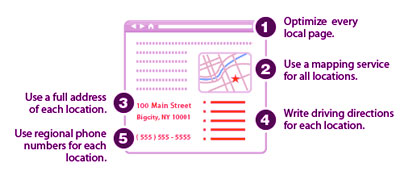
If you have multiple office locations there are a number of additional optimization steps you can take for each page. The image below gives a nice overview of how these pages can be structured.
Using this strategy for your most important local markets is a good way to get noticed and improve your ranking in organic search results.

